

🧭 动态路由与权限管理指南
🔑 权限配置流程
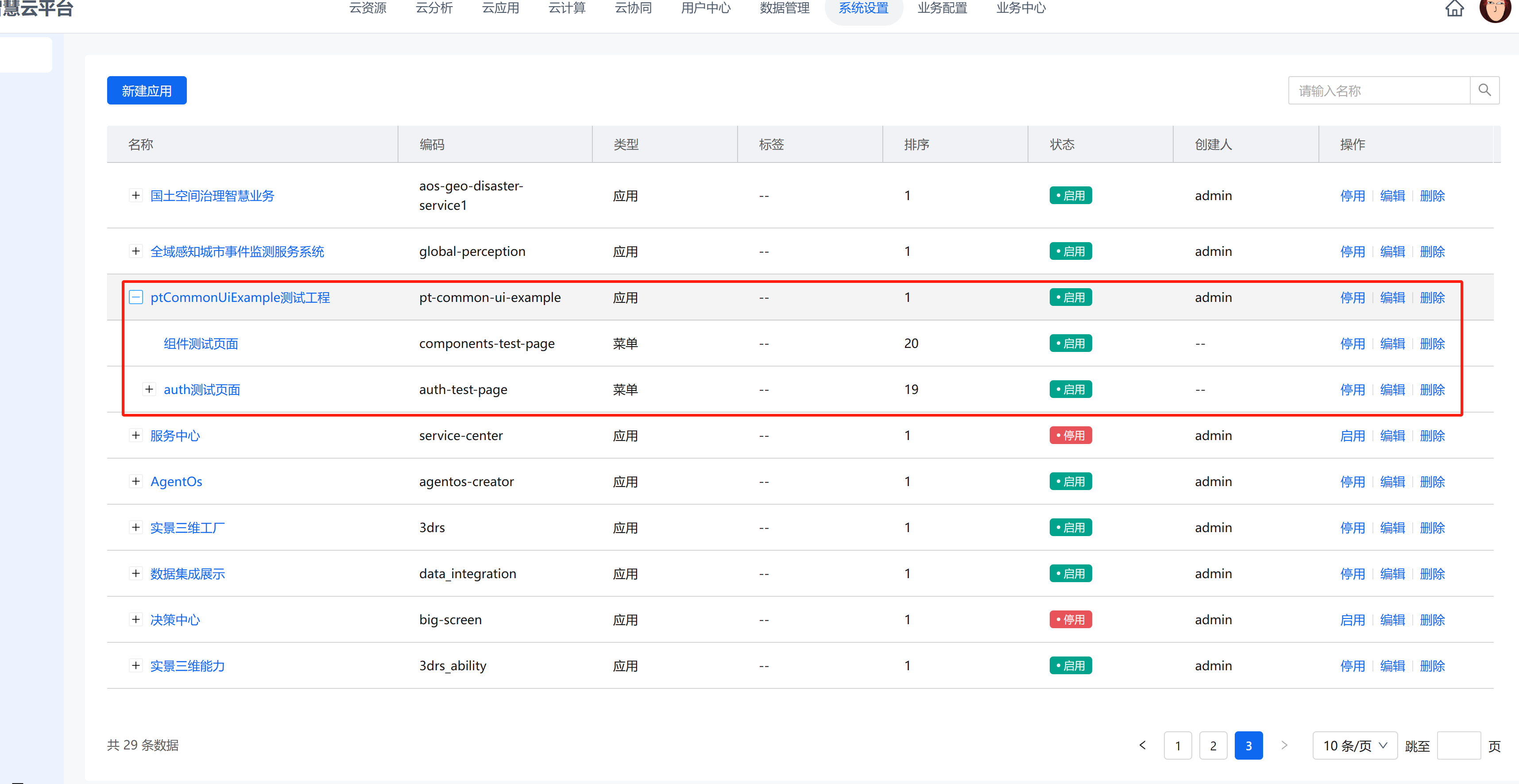
1️⃣ 中台权限配置
在业务中台-系统设置-应用管理页面添加应用、菜单、功能按钮:
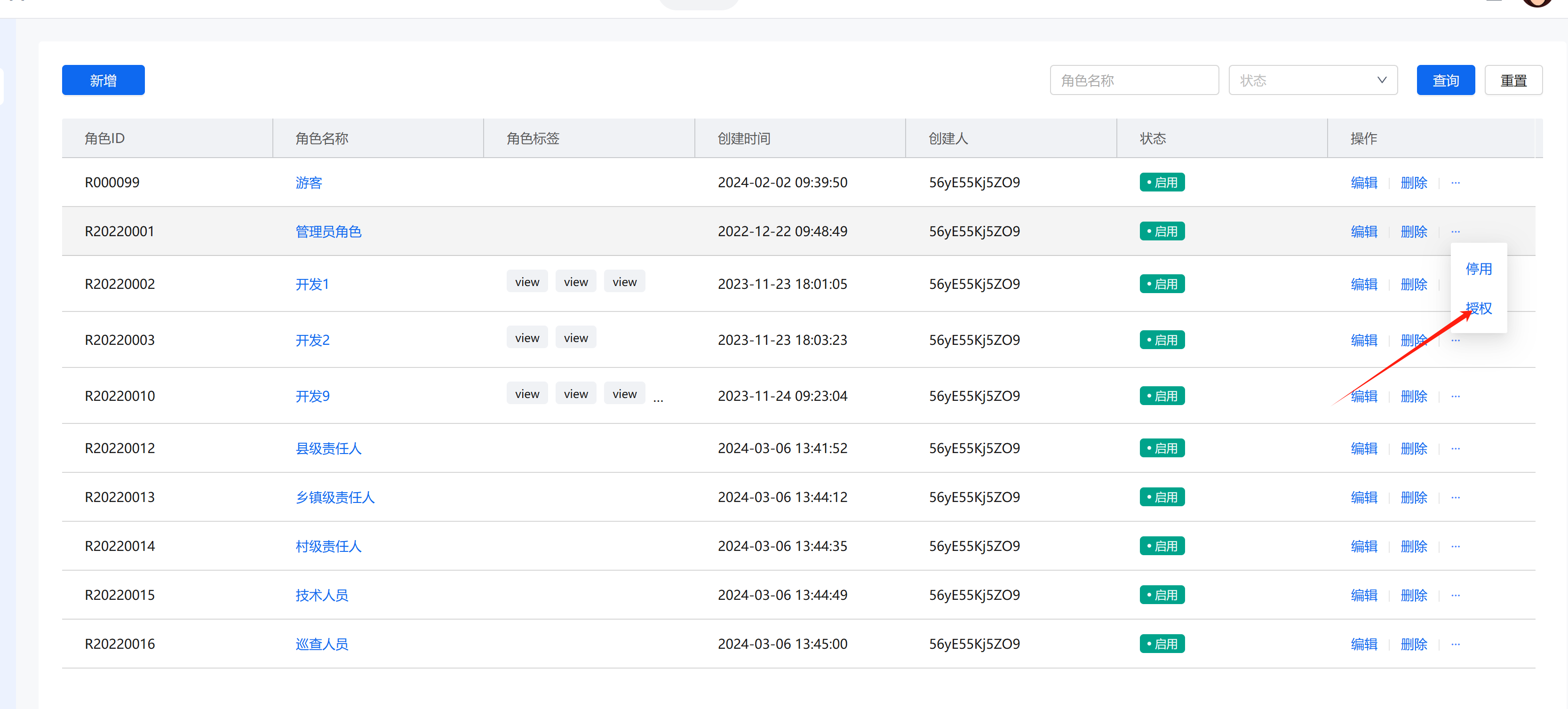
2️⃣ 角色授权配置
在业务中台-用户中心-角色管理页面选择角色并进行权限授权:
📁 路由文件配置
⚙️ 主路由文件 (index.ts)
创建 routers/index.ts 文件,配置路由实例和路由守卫:
ts
import { createRouter, createWebHistory } from 'vue-router'

import { AuthStore, initDynamicRouter } from '@pt/common-ui'
import type { Menu } from '@pt/utils/modules/router'
import { storage } from '@pt/utils/modules/storage'

import { getLoginUrl, ROUTER_WHITE_LIST } from '@/config/config'
import ConditionalNProgress from '@/config/nprogress'
import { errorRouter, staticRouter } from '@/router/modules/staticRouter'

// 引入 views 文件夹下所有 vue 文件
// @ts-ignore
const modules = import.meta.glob('@/views/**/*.vue')
/**
 * @description 动态路由参数配置简介
 * @param path ==> 菜单路径
 * @param name ==> 菜单别名
 * @param redirect ==> 重定向地址
 * @param component ==> 视图文件路径
 * @param meta ==> 菜单信息
 * @param meta.icon ==> 菜单图标
 * @param meta.title ==> 菜单标题
 * @param meta.isLink ==> 是否外链
 * @param meta.isOpenInNewTab ==> 外链是否独立tab打开
 * @param meta.isHide ==> 是否隐藏
 * @param meta.isFull ==> 是否全屏(示例:数据大屏页面)
 * @param meta.isAffix ==> 是否固定在 tabs nav
 * @param meta.isKeepAlive ==> 是否缓存
 * */

const router = createRouter({
  history: createWebHistory(import.meta.env.BASE_URL),
  routes: [...staticRouter, ...errorRouter],
  strict: false,
  scrollBehavior: () => ({ left: 0, top: 0 }),
})

/**
 * @description 路由拦截 beforeEach
 * */
router.beforeEach(async (to, _from, next) => {
  // 1.NProgress 开始
  ConditionalNProgress.start()

  const cookie_token = storage.get('token')
  const cookie_userInfoStr = storage.get('userInfo')
  const authStore = AuthStore()
  authStore.setRouteName(to.name as string)

  // 2.动态设置标题
  const title = import.meta.env.VITE_GLOB_APP_TITLE
  document.title = to.meta.title ? `${to.meta.title} - ${title}` : title

  // 3.判断是访问登陆页,有 Token 就在当前页面,没有 Token 重置路由并放行到登陆页
  /* if (to.path.toLocaleLowerCase() === LOGIN_URL) {
    if (cookie_token && cookie_userInfoStr) return next(from.fullPath);

    storage.clear();
    resetRouter();
    return next();
  } */

  // 4. 白名单可以直接访问
  if (ROUTER_WHITE_LIST.includes(to.path)) {
    return next()
  }

  // 5.判断是否有 Token,没有重定向到 login
  if (!cookie_token || !cookie_userInfoStr) {
    window.location.href = getLoginUrl()
    return next(false)
  }
  if (!authStore.authMenuListGet.length) {
    await initDynamicRouter(router, {
      appCode: "app_zhishiku",
      parentRouteName: 'layout',
      resolveComponent: (path: string) => {
        const module = modules['/src/views' + path + '.vue']
        if (module) return module
        console.warn(`未找到组件: /src/views${path}.vue`)
        console.warn('可用的组件路径:', Object.keys(modules))
        return () => Promise.reject(new Error(`Component ${path} not found`))
      },
      registerRoute(router, route, parentName) {
        // 注册到主布局
        router.addRoute(parentName, route)
        // 同时注册到 simple-layout (用于 iframe 嵌入)
        router.addRoute('simple-layout', {
          ...route,
          path: route.path.replace(/^\//, ''),
          name: `${String(route.name)}Simple`,
          meta: { ...route.meta, embed: 'iframe' },
        })
      },
      goLogin: () => {
        window.location.href = getLoginUrl()
      },
    })
    return next({ ...to, replace: true })
  }

  // 8. 动态首页跳转:如果是访问根路径,跳转到有权限的第一个菜单
  if (to.path === '/') {
    const firstMenu = authStore.flatMenuListGet.find(
      (item: Menu.MenuOptions) => !item.meta?.isHide && !item.meta?.isLink && item.path !== '/'
    )
    if (firstMenu) {
      return next({ path: firstMenu.path, replace: true })
    }
    // 如果一个菜单都没有,跳转到 404
    return next({ path: '/404', replace: true })
  }

  // 9.正常访问页面
  next()
})

/**
 * @description 路由跳转结束
 * */
router.afterEach(() => {
  ConditionalNProgress.done()
})

/**
 * @description 路由跳转错误
 * */
router.onError((error) => {
  ConditionalNProgress.done()
  console.warn('路由错误', error.message)
})

export default router📊 静态路由文件 (staticRouter.ts)
创建 src/routers/staticRouter.ts 文件,配置基础路由结构:
ts
import type { RouteRecordRaw } from 'vue-router'

// import { HOME_URL } from '@/config/config'

// ===== 主布局(带 Header / Sider)下的静态路由 =====
const mainLayoutRoutes: RouteRecordRaw[] = []

// ===== SimpleLayout(纯 router-view)下的静态路由 =====
const simpleLayoutRoutes: RouteRecordRaw[] = []

/**
 * staticRouter(静态路由)
 */
export const staticRouter: RouteRecordRaw[] = [
  // 移除根路径重定向,改由路由守卫动态跳转首页
  /* {
    path: '/',
    redirect: HOME_URL,
  }, */
  {
    path: '/',
    name: 'layout',
    component: () => import('@/layouts/Main.vue'),
    meta: { layoutMode: 'main' },
    children: mainLayoutRoutes,
  },
  {
    path: '/simple',
    name: 'simple-layout',
    component: () => import('@/layouts/Simple.vue'),
    meta: { layoutMode: 'simple' },
    children: simpleLayoutRoutes,
  },
  {
    path: '/dataset/create',
    name: 'DatasetCreate',
    component: () => import('@/views/DataSet/IndexComponents/CreateDataset.vue'),
  },
]

/**
 * errorRouter(错误页面路由)
 */
export const errorRouter = [
  {
    path: '/403',
    name: '403',
    component: () => import('@/components/ErrorPage/403.vue'),
    meta: {
      title: '403页面',
    },
  },
  {
    path: '/404',
    name: '404',
    component: () => import('@/components/ErrorPage/404.vue'),
    meta: {
      title: '404页面',
    },
  },
  {
    path: '/500',
    name: '500',
    component: () => import('@/components/ErrorPage/500.vue'),
    meta: {
      title: '500页面',
    },
  },
]

/**
 * notFoundRouter(找不到路由)
 */
export const notFoundRouter = {
  path: '/:pathMatch(.*)*',
  name: 'notFound',
  redirect: { name: '404' },
}⚓ 基础配置文件 (config/index.ts)
创建 src/config/index.ts 文件,定义基础路由配置:
ts
// * 首页地址(默认)
export const HOME_URL: string = '/components';  // 👉用不到了,自动取 firstRouteName

// * 登录页地址(默认)
export const LOGIN_URL: string = '/login';

// * Tabs(白名单地址,不需要添加到 tabs 的路由地址)
export const TABS_WHITE_LIST: string[] = ['/403', '/404', '/500', LOGIN_URL];

// * 路由白名单地址,不需要权限就可以访问(必须是本地存在的路由 staticRouter.ts)
export const ROUTER_WHITE_LIST: string[] = [
  '/register',
  '/forgotPassword',
  '/login/agreement',
  '/login/privacy',
  '/svg-preview/index',
  '/demo2',
  '/demo3',
];🌟 主要功能说明
- 🔐 权限控制:通过业务中台配置菜单和功能权限
- 🔄 动态路由:使用
initDynamicRouter方法动态加载路由 - 🛡️ 路由守卫:自动处理登录状态、权限检查和路由跳转
- 🗂️ 代码组织:将路由配置拆分为主文件、静态路由和基础配置
📝 最佳实践
- 将所有页面组件放在
views目录下,便于动态路由自动加载 - 使用约定式路径命名,保持与后台权限配置的一致性
- 合理配置白名单,避免公共页面也需要权限验证
- 使用路由懒加载提高性能