
🔐 useLogin 登录 Hook 使用指南
🎯 功能简介
useLogin 是一个强大的登录功能 Hook,支持账号密码登录和短信验证码登录两种方式。它提供了完整的登录流程管理,包括表单验证、状态管理、错误处理等功能。
🚀 核心特性
- 📱 支持账号密码和短信验证码两种登录方式
- 🔒 内置表单验证和错误处理
- ⏱️ 短信验证码倒计时功能
- 🔄 登录状态管理
- �� Token 和用户信息存储
- 🔗 支持登录后重定向
📝 使用方法
基本配置
typescript
import { useLogin } from '@pt/common-ui';
const {
  loading,
  formAccount,
  handleAccountLogin
} = useLogin({
  clientId: 'your_client_id',
  redirectUrl: 'optional_redirect_url'
}, () => {
  console.log('登录成功回调');
});完整示例及效果
vue
<template>
  <div class="w-100vw h-100vh">
    <a-form
      class="p-c w-100%"
      :model="formAccount"
      name="basic"
      :label-col="{ span: 8 }"
      :wrapper-col="{ span: 8 }"
      autocomplete="off"
      @finish="onLogin"
      @finishFailed="onLoginFailed"
    >
      <a-form-item
        label="Username"
        name="username"
        :rules="[{ required: true, message: 'Please input your username!' }]"
      >
        <a-input v-model:value="formAccount.username" />
      </a-form-item>

      <a-form-item
        label="Password"
        name="password"
        :rules="[{ required: true, message: 'Please input your password!' }]"
      >
        <a-input-password v-model:value="formAccount.password" />
      </a-form-item>

      <a-form-item name="isVerifyPass" :wrapper-col="{ offset: 8, span: 16 }">
        <a-checkbox v-model:checked="formAccount.isVerifyPass">选中模拟滑块验证</a-checkbox>
      </a-form-item>

      <a-form-item :wrapper-col="{ offset: 8, span: 16 }">
        <a-button type="primary" html-type="submit" :loading="loading">登录</a-button>
      </a-form-item>
    </a-form>
  </div>
</template>

<script setup lang="ts">
import { useLogin } from '@pt/common-ui';

const { loading, formAccount, handleAccountLogin } = useLogin({
  clientId: 'tudou_sa',
}, () => {
  console.log('登录成功');
});

// 设置默认值(可选)
Object.assign(formAccount, {
  username: '13259962526',
  password: 'qaz13579@',
  isVerifyPass: true,
});

const onLogin = (values: any) => {
  handleAccountLogin();
};

const onLoginFailed = (errorInfo: any) => {
  console.log('Failed:', errorInfo);
}
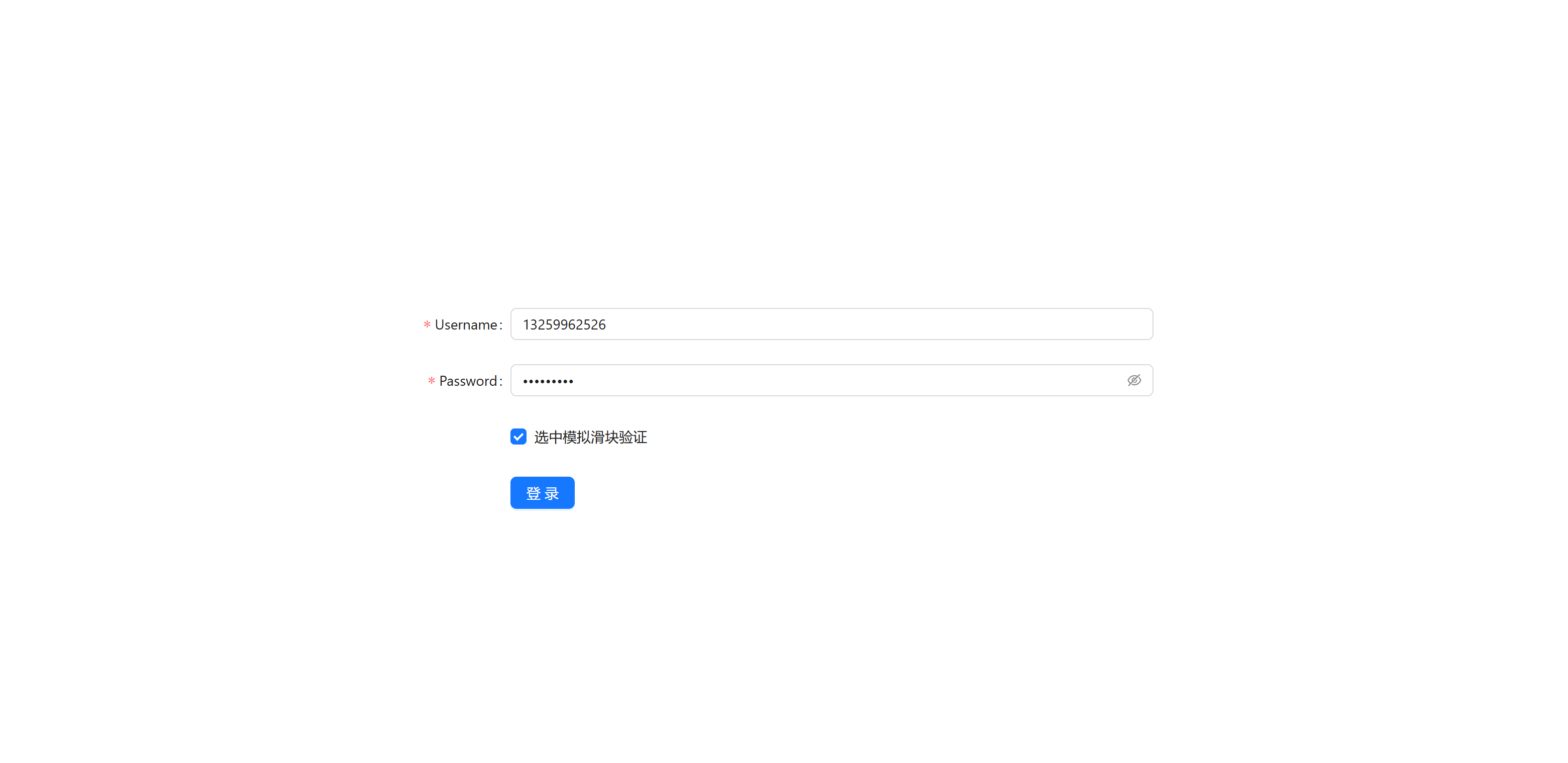
</script>运行效果如下:
⌨️ 完整源码实现
typescript
/**
 * @description 登录能力实现
 * */
import { ref, reactive, Ref } from 'vue';
import { useRoute, useRouter } from 'vue-router';
import md5 from 'js-md5';
import { message } from 'ant-design-vue';
import { storage, shuffleBase64Encode } from '@pt/utils';
import { CLIENT_ID } from '@/config/config';

import { safeBase64ToStr } from '@/utils';

// 这些 API 接口需要从原项目中复制或引入
import { getLoginSmsApi, loginApi, loginBySmsApi } from '@/api/modules/login';

// 登录验证器类型定义
export interface LoginValidator {
  validateMobile: (rule: any, value: string) => Promise<void>;
  validateDrag: (rule: any, value: boolean) => Promise<void>;
}

// 登录相关状态类型定义
export interface LoginState {
  loading: Ref<boolean>;
  activeKey: Ref<string>;
  formAccount: {
    username: string;
    password: string;
    isVerifyPass: boolean;
  };
  formCaptcha: {
    mobile: string;
    captcha: string;
  };
  captchaTime: Ref<number>;
}

// 登录设置类型
export interface LoginConfig {
  clientId?: string;
  redirectUrl?: string | null;
}

export const useLogin = (
  config: LoginConfig = {},
  onLoginSuccess: () => void
) => {
  const router = useRouter();
  const route = useRoute();

  // 获取登录页面配置
  const loginConfig = config;

  const oClientId = loginConfig.clientId || CLIENT_ID;

  // 登录状态
  const loading = ref(false);
  const activeKey = ref('account');

  // 账号登录表单
  const formAccount = reactive({
    username: '',
    password: '',
    isVerifyPass: false,
  });

  // 验证码登录表单
  const formCaptcha = reactive({
    mobile: '',
    captcha: '',
  });

  // 验证码倒计时
  const captchaTime = ref(0);

  // 验证器
  const validators: LoginValidator = {
    // 手机号验证
    validateMobile(rule: any, value: string) {
      if (!value) {
        return Promise.reject('请输入手机号');
      }
      const mobileReg =
        /^(13[0-9]|14[01456879]|15[0-35-9]|16[2567]|17[0-8]|18[0-9]|19[0-35-9])\d{8}$/;
      if (!mobileReg.test(value)) {
        return Promise.reject('请输入正确的手机号');
      }
      return Promise.resolve();
    },

    // 拖动验证
    validateDrag(rule: any, value: boolean) {
      if (!value) {
        return Promise.reject('请滑动验证');
      }
      return Promise.resolve();
    },
  };

  // 获取短信验证码
  const handleCaptcha = async (mobile: string): Promise<boolean> => {
    try {
      if (!mobile) {
        message.error('请输入手机号');
        return false;
      }

      const mobileReg =
        /^(13[0-9]|14[01456879]|15[0-35-9]|16[2567]|17[0-8]|18[0-9]|19[0-35-9])\d{8}$/;
      if (!mobileReg.test(mobile)) {
        message.error('请输入正确的手机号');
        return false;
      }

      loading.value = true;
      const { msg, data } = await getLoginSmsApi({ username: mobile });
      loading.value = false;

      captchaTime.value = 60;
      message.success(msg);

      // 启动倒计时
      const timer = setInterval(() => {
        if (captchaTime.value === 0) {
          clearInterval(timer);
          return;
        }
        captchaTime.value -= 1;
      }, 1000);

      return true;
    } catch (error) {
      loading.value = false;
      message.error('获取验证码失败');
      return false;
    }
  };

  // 处理账号密码登录
  const handleAccountLogin = async (): Promise<boolean> => {
    const { username, password, isVerifyPass } = formAccount;
    try {
      if (!username || !password) {
        message.error('请输入账号和密码');
        return false;
      }

      if (!isVerifyPass) {
        message.error('请完成滑动验证');
        return false;
      }

      loading.value = true;

      // 调用登录接口
      const apiParams = {
        name: username,
        client: oClientId,
        // @ts-ignore
        pwd: shuffleBase64Encode(md5(password)),
      };

      const { msg, data } = await loginApi(apiParams);

      if (!data) {
        loading.value = false;
        message.error(msg);
        return false;
      }

      // 保存用户信息并跳转
      await saveTokenAndRedirect(data);
      return true;
    } catch (error) {
      loading.value = false;
      message.error('登录失败');
      return false;
    }
  };

  // 处理短信验证码登录
  const handleSmsLogin = async (): Promise<boolean> => {
    const { mobile, captcha } = formCaptcha;
    try {
      if (!mobile || !captcha) {
        message.error('请输入手机号和验证码');
        return false;
      }

      loading.value = true;

      // 调用验证码登录接口
      const apiParams = {
        name: mobile,
        validCode: captcha,
      };

      const { msg, data } = await loginBySmsApi(apiParams);

      if (!data) {
        loading.value = false;
        message.error(msg);
        return false;
      }

      message.success(msg);

      // 保存用户信息并跳转
      await saveTokenAndRedirect(data);
      return true;
    } catch (error) {
      loading.value = false;
      message.error('登录失败');
      return false;
    }
  };

  // 保存token和用户信息并进行页面跳转
  const saveTokenAndRedirect = async (data: any) => {
    // 提取用户信息
    let userInfo = {
      tenantId: data.principalInfo.tenantId,
      userId: data.principalInfo.userId,
      userName: data.principalInfo.userName,
    };

    // 存储token和用户信息
    storage.set({
      expires_time: data.tokenInfo.tokenSessionTimeout / (60 * 60 * 24),
      token: data.tokenInfo.tokenValue,
      access_token: data.tokenInfo.tokenValue, // 兼容旧的SAAS应用
      userInfo: JSON.stringify(userInfo),
    });

    // 在此位置添加一个登录成功回调
    if (onLoginSuccess) {
      onLoginSuccess();
    }
    // 处理重定向
    const redirect =
      loginConfig.redirectUrl || (route.query.redirect as string);

    if (redirect) {
      const goUrl = safeBase64ToStr(redirect);
      window.location.href = goUrl;
    } else {
      router.push('/');
    }

    loading.value = false;
  };

  // 获取所有登录状态,用于UI渲染
  const getLoginState = (): LoginState => {
    return {
      loading,
      activeKey,
      formAccount,
      formCaptcha,
      captchaTime,
    };
  };

  // 重置状态
  const resetState = () => {
    loading.value = false;
    activeKey.value = 'account';

    Object.assign(formAccount, {
      username: '',
      password: '',
      isVerifyPass: false,
    });

    Object.assign(formCaptcha, {
      mobile: '',
      captcha: '',
    });

    captchaTime.value = 0;
  };

  return {
    // 状态相关
    loading,
    activeKey,
    formAccount,
    formCaptcha,
    captchaTime,
    getLoginState,
    resetState,

    // 验证器
    validators,

    // 功能方法
    handleCaptcha,
    handleAccountLogin,
    handleSmsLogin,
  };
};🔧 配置选项
| 参数 | 类型 | 必填 | 说明 |
|---|---|---|---|
| clientId | string | 是 | 客户端ID |
| redirectUrl | string | 否 | 登录成功后的重定向地址 |
💡 最佳实践
- 在登录表单中使用
loading状态来控制按钮的禁用状态 - 使用
formAccount和formCaptcha来管理表单数据 - 通过
validators进行表单验证 - 使用
resetState在组件卸载时清理状态 - 在登录成功后处理重定向逻辑
⚠️ 注意事项
- 确保在使用前正确配置
clientId - 密码会经过 MD5 加密和 Base64 编码处理
- 登录成功后会自动存储 token 和用户信息
- 支持自定义重定向地址,优先级:配置 > URL参数 > 默认首页